LinkedIn outreach: how to do cold outreach on LinkedIn in 2026
Guide · Updated July 2026
Cold outreach on LinkedIn is a two-step motion: a connection request, then a message after the accept. This is a practical guide for founders running their own LinkedIn outreach: the weekly invite math, what to send at each step, what automation tools actually do, and when plain cold email is the better channel.
Why LinkedIn outreach is different from cold email
Two steps, your real name, and roughly double the replies.
The two-step. Cold email is one send: the message lands in an inbox and lives or dies there. LinkedIn outreach is two sends: first a connection request, then, only if the prospect accepts, the actual message. Each step has its own numbers and its own failure mode, and each gets its own section below.
Your identity is attached. A cold email can come from an alias on a secondary domain. A LinkedIn message comes from your face, your name, and your work history, and the prospect reads that profile before deciding on the accept. This cuts both ways: a credible founder profile outperforms any subject line, and the account behind every send is your own, which matters once automation enters the picture.
Replies run higher. In the public platform datasets, LinkedIn message replies run about double cold email replies in the same studies. The channel earns that gap the hard way: every message goes to someone who already accepted you.
Average connection accept rate
29.61%
Average message reply rate
10.3%
Expandi's platform data across 70,000+ campaigns. The full set of LinkedIn and email studies, with sources and caveats, is on the cold outbound benchmarks page.
The catch. Those replies come at the cost of scale. LinkedIn caps how many invites you can send, and the cap is the single most important fact about the channel, so the arithmetic comes first.
The connection-request math: weekly invite limits are real
The cap makes targeting the whole game.
The cap. LinkedIn does not publish a number, but the weekly invite limit is real: send enough requests and the "you've reached the weekly invitation limit" wall goes up until your rolling seven-day window resets. The commonly reported cap is around 100 connection requests a week for most accounts; automation vendors report 150 to 200 for some Sales Navigator and long-established accounts, and lower effective ceilings for new or quiet profiles. Treat every one of those figures as observed, not official.
The arithmetic. Run the public averages through a maxed-out week. The Belkins and Expandi joint study measured 18.7% of invited prospects accepting, a 7.2% message reply rate, and 1.3% of connected prospects booking a meeting; the study is on the benchmarks page. At those averages, 100 invites a week produces about 19 new connections, and about one booked meeting a month. That is the whole channel at average quality: real replies, tiny volume.
What the cap changes. Email rations attention and scales sends; LinkedIn rations sends. Every invite spent on a poorly chosen prospect is one you cannot spend on a good one that week, so list quality moves a LinkedIn campaign more than any message edit will. The targeting discipline is the same as email, and the order of operations is in our B2B SaaS outreach guide.
Housekeeping. Withdraw invites that have sat pending for a few weeks. A large pile of ignored invites is feedback about your targeting, and it is commonly reported to lower the effective ceiling LinkedIn gives you. The next three sections are the tips founders actually ask for: the note, the first message, and the cadence.
Connection note or no note
The public data is mixed; the reasoning is not.
The short answer. Send no note rather than a templated note, and a real note only when you can name the specific reason you want this specific person.
What the data says. The automation platforms have published tests pointing both ways: some found blank invites accepting as well as or better than noted ones, others found genuinely specific notes outperforming both. Where the tests agree is the floor: a templated note performs worst.
Why blank beats template. A blank invite reads as neutral; people connect on LinkedIn without stating reasons all the time. "I came across your profile and was impressed" reads as the first line of a pitch, because it always is, and the prospect declines the pitch by declining the invite.
The note cap. Free accounts are commonly reported to be limited to a handful of personalized notes a month, five to ten in most reports, while Premium accounts have no note cap. On a free account the default is chosen for you most of the week anyway.
The first message after an accept
The accept is permission to be specific. It is not interest.
Do not pitch the accept. The most common failure on this channel has a name, the pitch slap: a paragraph of product pitch seconds after the accept. An accept is a neutral act. Treat it as permission to say something specific, not as a buying signal.
What to send. The same first-line rule as cold email: open with the one observation that proves you looked at their company, then make one ask. On LinkedIn the message reads in a chat window, so two or three sentences is the whole message; the first-line test itself is in the B2B SaaS outreach guide.
When to send it. Not within seconds; an instant message after an accept reads as automation, because it usually is. Within a day or two, while the accept is still fresh in their notifications.
How often to follow up on LinkedIn
Fewer than email, and each one earns its send.
Fewer touches. Email tolerates two or three follow-ups in a thread. LinkedIn tolerates one, maybe two. The chat thread stacks: every unanswered bump sits on the prospect's screen above the reply box, permanently, in your name.
What earns the send. The same rule as email: a new observation, a sharper ask, or a piece of work done since the last message. "Just bumping this" adds nothing and reads as automation.
The total across channels. Four to six touches across LinkedIn and email combined, spread over two to three weeks, then stop. Silence after a good sequence means the list or the message, and the fix is upstream, not a seventh touch.
LinkedIn outreach tools: what automation does, and what it risks
The tools are real, and so is the account on the line.
What the tools do. LinkedIn outreach automation tools (Expandi, Waalaxy, PhantomBuster, and dozens like them) queue connection requests and messages, run them as multi-step sequences, pace sends to stay inside the limits, and report accepts and replies in a dashboard. Functionally, they are sequencers for a channel that does not officially have one.
The fact underneath. There is no separate sending infrastructure on LinkedIn. Email lets a secondary domain absorb the reputational damage of a bad campaign; a LinkedIn send, automated or hand-typed, goes out from a person's real account. Whatever a tool sends, it sends as you.
The risk, stated plainly. LinkedIn's user agreement prohibits third-party automation software, and LinkedIn restricts accounts it decides are automated. Vendors reduce the odds with human-like pacing and conservative per-account limits, and plenty of people run these tools for long stretches without trouble, but nobody publishes a restriction rate, and the account at stake carries your name, your history, and your network.
The tradeoff in one sentence. Automation buys volume on a channel whose own math punishes volume, and stakes your account to get it. If volume is genuinely your constraint, that is what email is for, which is the routing question next.
Cold email vs LinkedIn outreach: when each wins
A routing decision, not a rivalry.
When LinkedIn wins. Small, high-value lists of founder and executive targets: the people who ignore cold email but still read their LinkedIn inbox, because a message there arrives with a face and a work history attached. The invite cap hurts less when the list is short, and a first-degree connection outlives a job change in a way an email address does not.
When email wins. Any list bigger than the invite math supports. Email has no hundred-a-week ceiling, keeps follow-ups in one thread, and gives you the measurement LinkedIn never will: deliverability tests, bounce rates, placement checks. Email is the workhorse channel; LinkedIn is the precision one.
Run both. Most founder motions sequence the two: LinkedIn invites for the top slice of the list, email for the rest, four to six touches total across both. The email half of the motion is the B2B SaaS outreach guide, and the measured numbers behind both channels are on the cold outbound benchmarks page.
Demo-led outbound over LinkedIn
A short message does less convincing when the demo does more.
The ceiling on copy. Everything above raises the floor of a LinkedIn campaign. It does not change what the message is: two or three sentences with no room to argue you are worth a meeting. The way past that ceiling is to stop arguing and attach proof, something built for this one prospect that they can watch work.
Where our product fits. This is the one section of this page about our product. driftwood (driftwood.sh) is an AI SDR built for exactly this motion: for each prospect, the agent does the research, builds a working demo of your product for their business, and drafts the short message that carries it. You approve every send, and messages go out from your own LinkedIn account. The demo does the convincing, so the message can stay two sentences long. This is demo-led outbound.
Reply rate before
under 1%
Reply rate, week one
over 14%
On the same lead list the founders had been working themselves, replies went from under 1% to over 14% in week one at Autosana (YC S25), including founders who had ignored more than four months of prior outreach. One company and one week, observed once, not promised; the methodology is in the Autosana case study.
what a volume agent sends
quick question
Hey ,
Hope you're doing well! Huge fan of what you're building, truly impressive momentum.
I'm with an AI-powered QA platform, the all-in-one way to ship faster with confidence. Teams like yours are seeing huge results and we'd love to show you how.
A few things teams love:
- Cut regression time by up to 90%
- Seamless integration with your existing stack
- Enterprise-grade security (SOC 2 Type II)
Any chance you have 15 minutes this week? You can grab time here.
Best,
SDR @
P.S. Happy to send over a case study if that's easier!
Left on opened.
what driftwood sent
4 months of outreach, no reply
Jul 9

hey , found a bug on . our agents caught your pricing page still promising early access for features lower tiers already have…
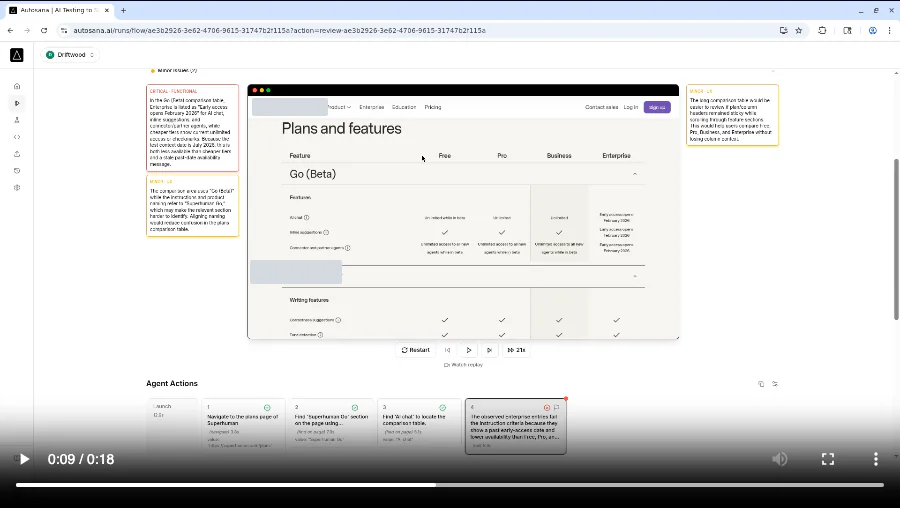
driftwood built this demo
Jul 10 · 12 hours later
send me a blurb + demos to and I'll forward to my team - best
Call booked · Jul 12
The right window is a real send from the Autosana week; identities redacted.
Without a tool. Demo-led LinkedIn outreach works by hand too: audit a prospect's public product, build a small working example, and send what you found. The cost is founder hours, and the arithmetic of those hours is the founder-led sales page.
Common questions
The questions founders ask about LinkedIn as a channel.
Product questions about driftwood are on the FAQ.
How many connection requests can you send on LinkedIn per week?
LinkedIn does not publish the number. The commonly reported weekly invite limit is around 100 connection requests for most accounts, with automation vendors reporting 150 to 200 for some Sales Navigator and long-established accounts, and lower effective ceilings for new or quiet profiles.
The limit works on a rolling seven-day window that resets from your first send. Treat all of those figures as observed by users and vendors, not confirmed by LinkedIn.
Should you send a note with a LinkedIn connection request?
A blank invite beats a templated note. Published platform tests point both ways on notes overall, but templated notes come last consistently. Send no note by default, and a note only when you can name the specific reason you want this specific person.
Free accounts are commonly reported to be capped at roughly five to ten personalized notes a month anyway, so for most senders the default is already chosen.
Is LinkedIn outreach automation safe for your account?
No tool can make it safe in the terms-of-service sense. LinkedIn's user agreement prohibits third-party automation software, and accounts do get restricted for it. Vendors reduce the odds with human-like pacing and per-account limits, and many people run these tools for long stretches without trouble, but nobody publishes a restriction rate.
The account at stake carries your name, your history, and your network. Make the bet deliberately or not at all.
When is cold email better than LinkedIn outreach?
When the list outgrows the invite math. Email has no hundred-a-week ceiling, supports threaded follow-ups, and gives you deliverability tooling and clean measurement that LinkedIn does not. LinkedIn replies run higher per message in the public datasets; email wins on volume and measurability.
Most founder motions run both: LinkedIn for the top of the list, email for the rest. The email half is the B2B SaaS outreach guide.
What is the best AI SDR for LinkedIn outreach?
It depends on which problem you want the tool to solve. Volume tools automate more sends of the same message, which the weekly invite cap punishes. We build driftwood, which takes the opposite bet: fewer sends, each carrying a working demo of your product built for the specific prospect, drafted by the agent, approved by you, and sent from your own LinkedIn account.
We keep a comparison of AI SDR tools, including the fully autonomous ones, if you want the whole category side by side.
See a demo built for your business
If your LinkedIn messages have to do all the convincing, put a demo in them instead. Twenty minutes, and we will show you what your prospects would see.
Book a demo